Subtitle Workflow vs No-Subtitle Workflow: What Actually Saves Time?
A practical comparison of subtitle-first and no-subtitle sentence-mining workflows across setup effort, weekly time cost, and output quality.
What You'll Learn
- When subtitle-first workflows still make sense
- Where no-subtitle workflows save the most time
- How to choose the right path for your schedule
What is a subtitle-first workflow?
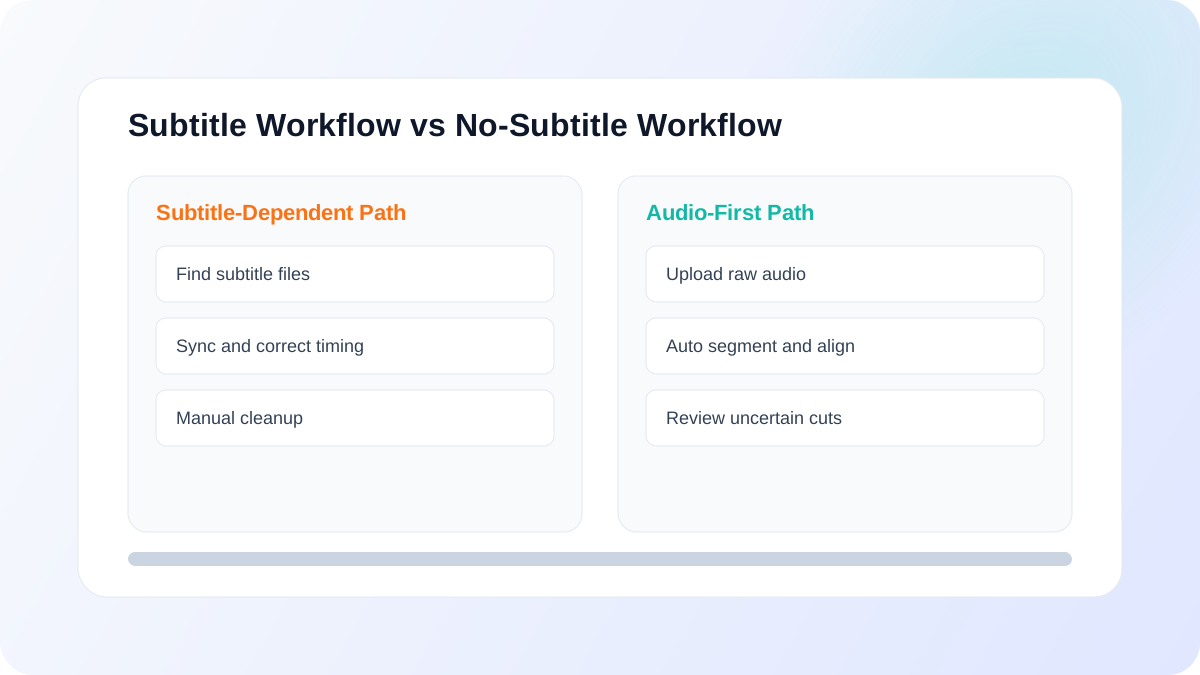
Subtitle-first means you start with an existing subtitle track, then sync, split, review, and export clips. This can work well when clean subtitles are already available and aligned.
What is a no-subtitle workflow?
No-subtitle means you start from raw audio, generate transcript alignment automatically, segment, review uncertain cuts, and export. This avoids subtitle sourcing and sync bottlenecks.
Side-by-side comparison: setup, speed, and quality
Setup complexity
Subtitle-first setup can be lightweight if good subtitles already exist. Otherwise, sourcing and syncing subtitles adds steps and tools. No-subtitle workflows reduce setup dependencies when your source has no reliable subtitle track.
Weekly time cost
Subtitle-first may be fast on ideal inputs, but variable on messy inputs. No-subtitle workflows are often more predictable for recurring prep because the same pipeline runs each week.
Review burden
Both workflows still need human review. The best approach is to review only uncertain boundaries instead of manually auditing every segment.
Output usability
The winner is the workflow that gives you reusable clips with transcript context and timestamps, ready for repetition without extra reformatting.
Who should use each workflow?
- Use subtitle-first if your sources consistently have clean, well-aligned subtitles.
- Use no-subtitle if your sources are variable, subtitle quality is inconsistent, or you need one repeatable pipeline.
- For most recurring learners/instructors, predictability usually matters more than ideal-case speed.
Decision checklist
- Do you reliably have quality subtitles for most sources?
- Is your current setup stable week-to-week without manual fixes?
- Are your outputs immediately usable for study sessions?
- Can you keep prep inside a fixed time box?
If most answers are "no," a no-subtitle, single-pipeline workflow is usually the better fit.
Related reading
Choose your workflow and start
The best workflow is the one you can run consistently every week with low setup overhead and high output usability.
Ready to apply this workflow?
Upload your next audio file and run the full pipeline
Start from upload, process in the background, and export study-ready clips in one workflow.